
When sending email campaigns, replies from recipients are sent to a designated reply-to email address. By default, this is typically set to your primary account email. However, you can change the reply-to address for individual campaigns when needed—such as directing compliance-related responses to a specific email address.
Key Steps
Step 1: Access Your Email Campaign
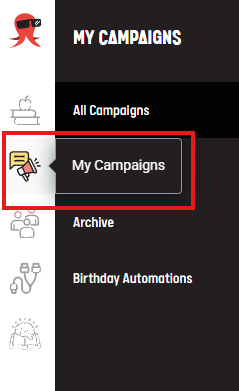
- On your campaigns dashboard, click My Campaigns to locate the email you want to edit.
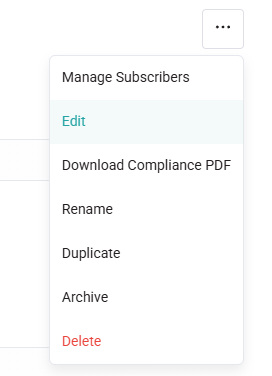
- Click the three dot icons to Edit the campaign.
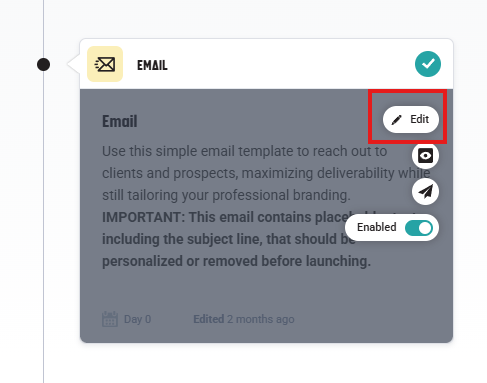
- Navigate to the email step of the campaign and hover over it to click the Edit (pencil icon) option.
Step 2: Edit Email Details
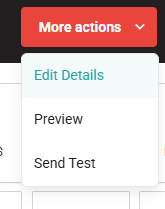
- Click on the More Actions menu at the top right corner of the editor.
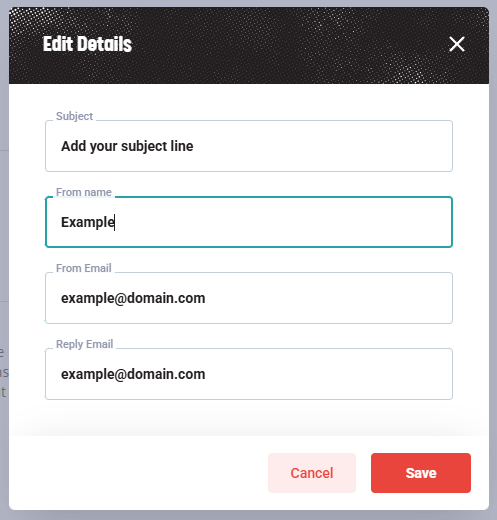
- Select Edit Details from the dropdown menu.
Step 3: Update the Reply-To Email Address
- In the edit details section, locate the Reply Email field.
- Enter the new reply-to email address you want to use for this specific campaign.
- Save your changes.
Important Considerations
Email Deliverability and Reputation
Use this feature sparingly. Changing the reply-to address occasionally is acceptable, but doing it frequently can negatively impact your email reputation and deliverability. Email service providers may flag emails with inconsistent reply-to addresses as potentially suspicious.
When to Use a Different Reply-To Address
- Compliance or legal matters: Direct responses to a compliance or legal team email address.
- Specific campaigns: Route replies from particular campaigns (e.g., surveys, feedback requests) to dedicated mailboxes.
- Temporary campaigns: Use for one-time or infrequent email sends.
Best Practices
- Form Options: Where possible, use forms to collect responses, allowing you to receive multiple email notifications without sacrificing your email reputation.
- Maintain consistency: Use your default reply-to address whenever possible to protect your email reputation.
- Test before sending: Send a test email to yourself and verify that replies are delivered to the correct address.
Need Help?
If you have questions about changing reply-to addresses or need assistance with your email campaigns, please contact our support team.