
PlannerSearch® helps prospective clients find you. Snappy Kraken helps you follow up, stay connected, and turn interest into new client relationships.
What this article helps you do
- Understand how PlannerSearch leads can fit into your Snappy Kraken marketing workflow
- Connect PlannerSearch lead submissions to your Snappy Kraken account
- Follow up with new leads and nurture them over time using Snappy Kraken campaigns
- Track engagement (opens, clicks, and other activity) in Snappy Kraken
Before you begin
- You need an active Snappy Kraken account.
- You need access to your PlannerSearch® account.
How it works
When a prospect finds you on PlannerSearch and submits an inquiry, you can use Snappy Kraken to:
- Respond to new PlannerSearch leads automatically
- Continue the conversation with automated campaigns and professionally created advisor content
- Stay connected with prospects over time (even if they aren’t ready to meet right away)
- Track opens, clicks, and engagement from your follow-up efforts
How to Use PlannerSearch with Snappy Kraken
1) Connect PlannerSearch lead submissions to Snappy Kraken
Sign in to your Snappy Kraken account.
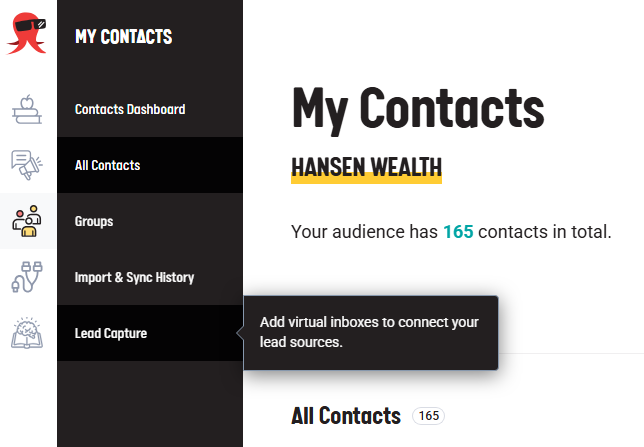
Navigate to Lead Capture:
In Campaigns, go to My Contacts → Lead Capture.
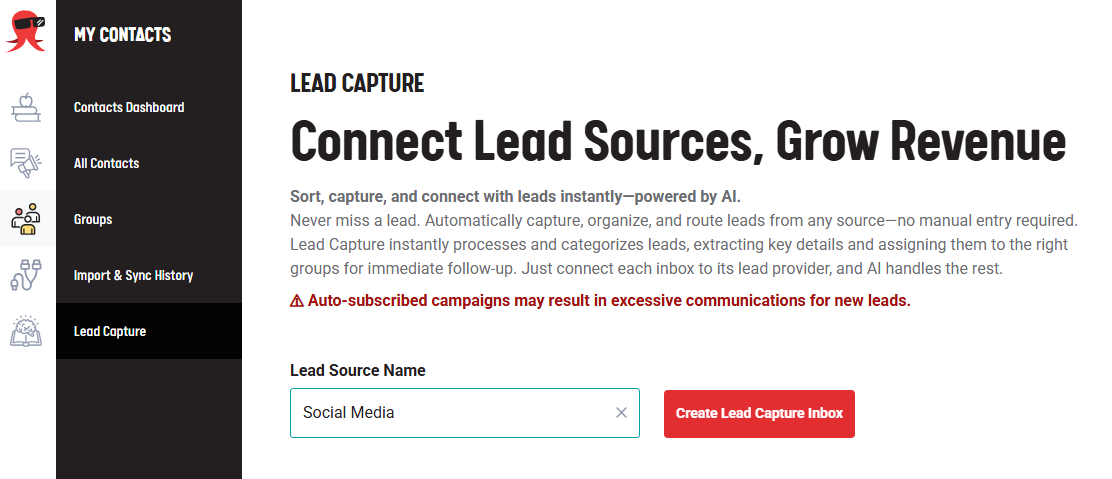
Create a New Inbox:
Enter a name for your new lead source.
Click on Create Lead Capture Inbox.
Select a group to associate the leads with.
- Any new lead coming from that inbox will be automatically added to the group.
- If you auto-subscribe the group to a campaign, new contacts from the Lead Capture inbox will immediately enroll in the campaign.
Forward New Leads from PlannerSearch to Snappy Kraken:
- Copy the email address.
- Sign in to your PlannerSearch account.
- Scroll down to the Connect to Snappy Kraken tab.
- Paste the email address into the Snappy Kraken Lead Capture Email field.
- Click Add and then save your changes.
The system will automatically process the submission and add your PlannerSearch lead to your Snappy Kraken contact list, ready for nurturing!
2) Start an automated follow-up for new PlannerSearch leads
Once leads are flowing into Snappy Kraken, use the Snappy Kraken AutoSubscribe feature to automatically email contacts added to your chosen lead group. Click here to learn how.
Use our advanced search and filtering tools to find the right campaign for your target audience. Snappy Kraken offers plenty of campaigns to choose from.
3) Track engagement and prioritize your outreach
Use Snappy Kraken reporting/engagement indicators to see:
- Who opened or clicked
- Which messages are getting attention
- Which leads appear most engaged and may be ready for a meeting
For detailed steps and options for tracking your statistics, click here. Smart Growth Suite can also help you group leads by engagement (e.g., engaged vs. non-engaged) and send each group appropriate follow-up campaigns.
What happens next
After your integration and campaigns are running:
- New PlannerSearch leads are captured and can be followed up with consistently.
- Prospects continue receiving helpful touchpoints even if they aren’t ready to meet right away.
- You can refine your messaging and follow-up based on engagement trends over time.
Troubleshooting
I’m not receiving PlannerSearch leads in Snappy Kraken.
This integration uses the Snappy Kraken Lead Capture feature. For detailed troubleshooting steps, click here.
If the issue persists, send our support team the missing lead’s email address and the date and time it was submitted so we can investigate.
When to contact Support
Contact Support if you need help with:
- You’re having trouble creating a Lead Capture inbox.
- Leads aren’t appearing in your Snappy Kraken contact list.